Lovable
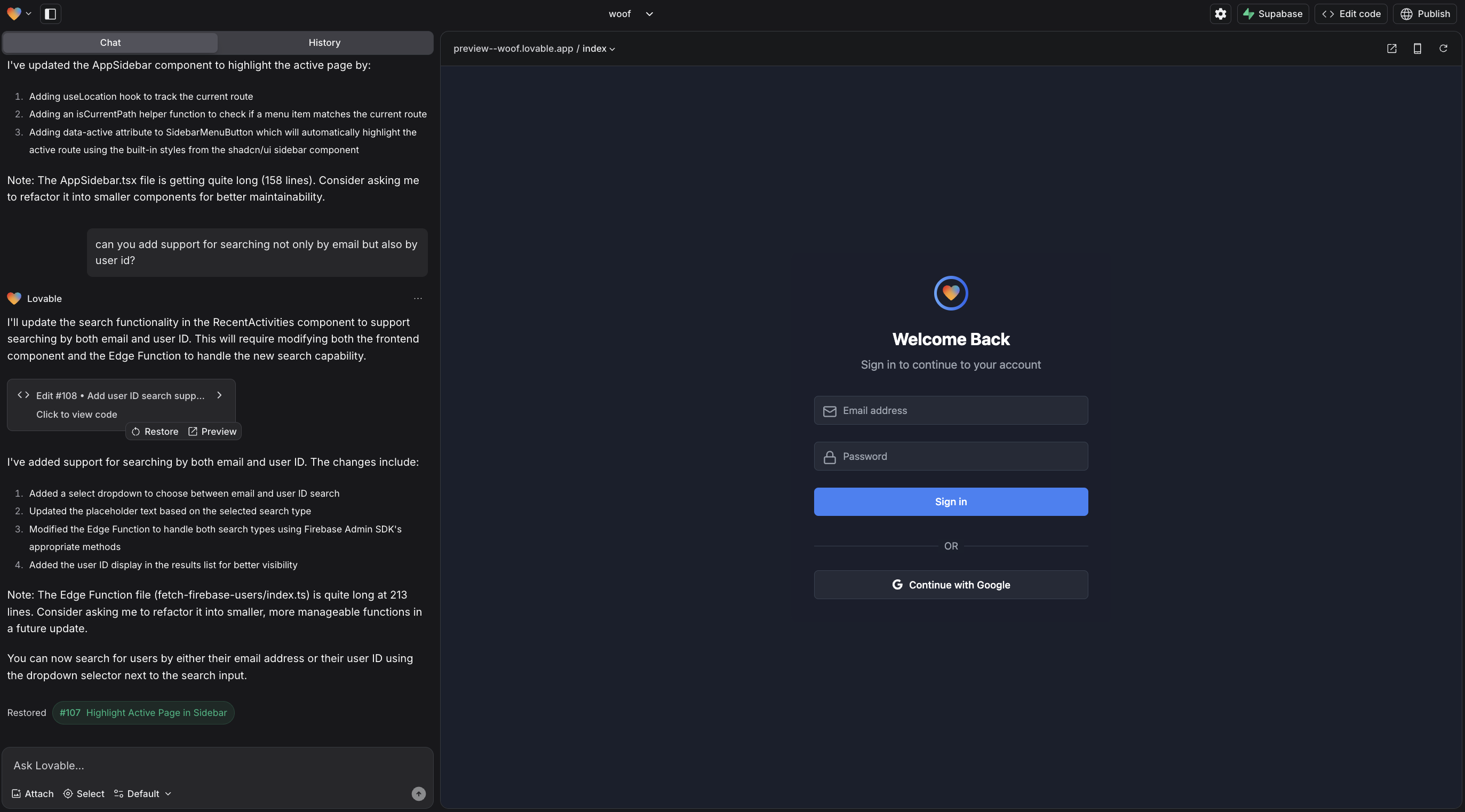
Prompt ↔ ArtifactProject editor · generated app beside implementation activity
Conversation, live preview, visual editing, and code remain different ways into the same artifact.
Visual anatomy study · 15 products
The center of gravity shifts—from conversation, to code, to canvas, to graph—but the same structural loop keeps resurfacing: frame intent, compose, inspect, run, and release.


Category read
AI rarely stands alone. It is placed beside a manipulable representation of the work: a rendered artifact, editable code, a visual canvas, or an executable graph.
01 · AI Builder Landscape
These are structural models, not market segments. Some products bridge more than one; they are grouped by what visually dominates the primary build state.
A split workspace in which conversation and the running thing stay visible together.
A familiar repository and editor, expanded with agent and verification surfaces.
The artifact itself—or a spatial composition of components—is the primary work surface.
An executable graph makes sequence, branching, dependencies, and tool use visible.
A capability palette and playground lead users from model behavior to an application.
02 · Builder Anatomy Boards
Wide product views are paired with a deliberately simple structural reading. Labels describe visible regions—not hidden technical architecture.

Project editor · generated app beside implementation activity
Conversation, live preview, visual editing, and code remain different ways into the same artifact.

Project Editor · Agent conversation beside a running app
The conversational builder expands into an IDE, design canvas, tool drawer, task board, and publish flow.

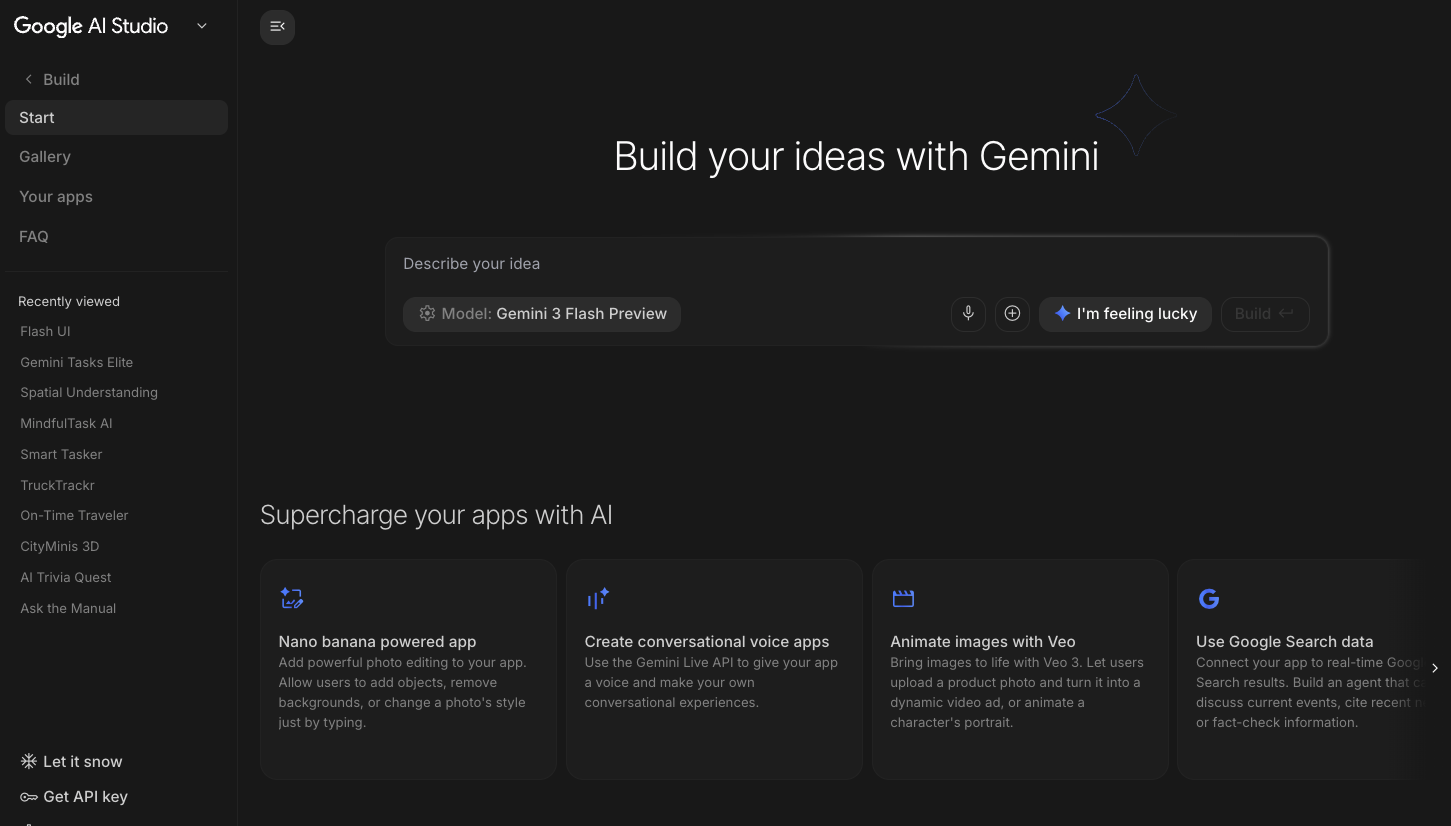
Build home · prompt-led entry with capability starters
The builder begins as a model-and-capability studio, then opens into native code editing, preview, and deployment.

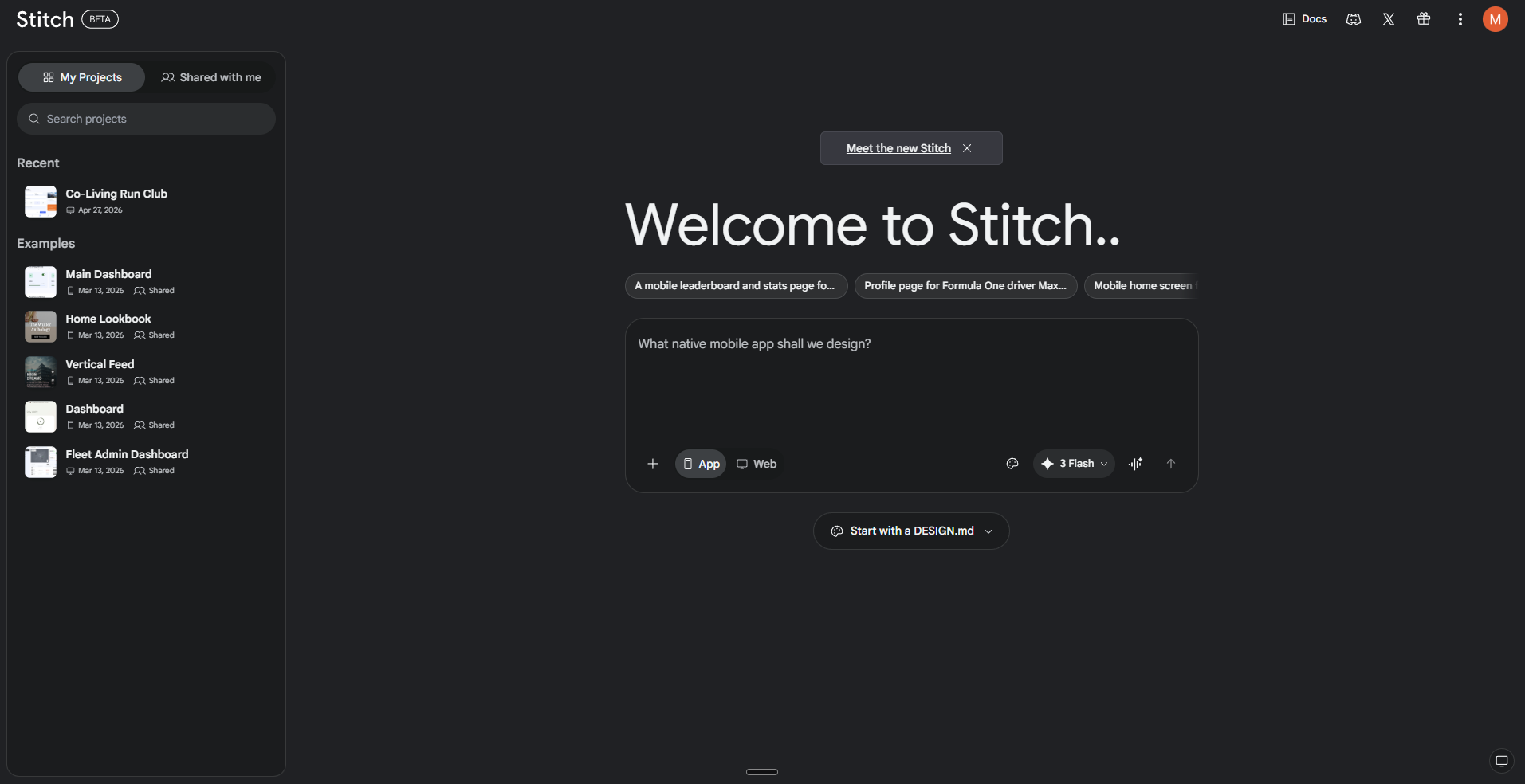
Project home · prompt-led generation for mobile and web screens
Generated screens—not source files—form the primary object, with chat, themes, variants, Figma, and code around them.

App editor · UI canvas with query editor and inspector
Directly placed UI components are bound to queries and resources; AI assists inside an explicit composition system.

Agent-first IDE · Editor with path into Agent Manager
The product adds a managerial layer above the IDE: parallel agents communicate through tasks, artifacts, and browser evidence.

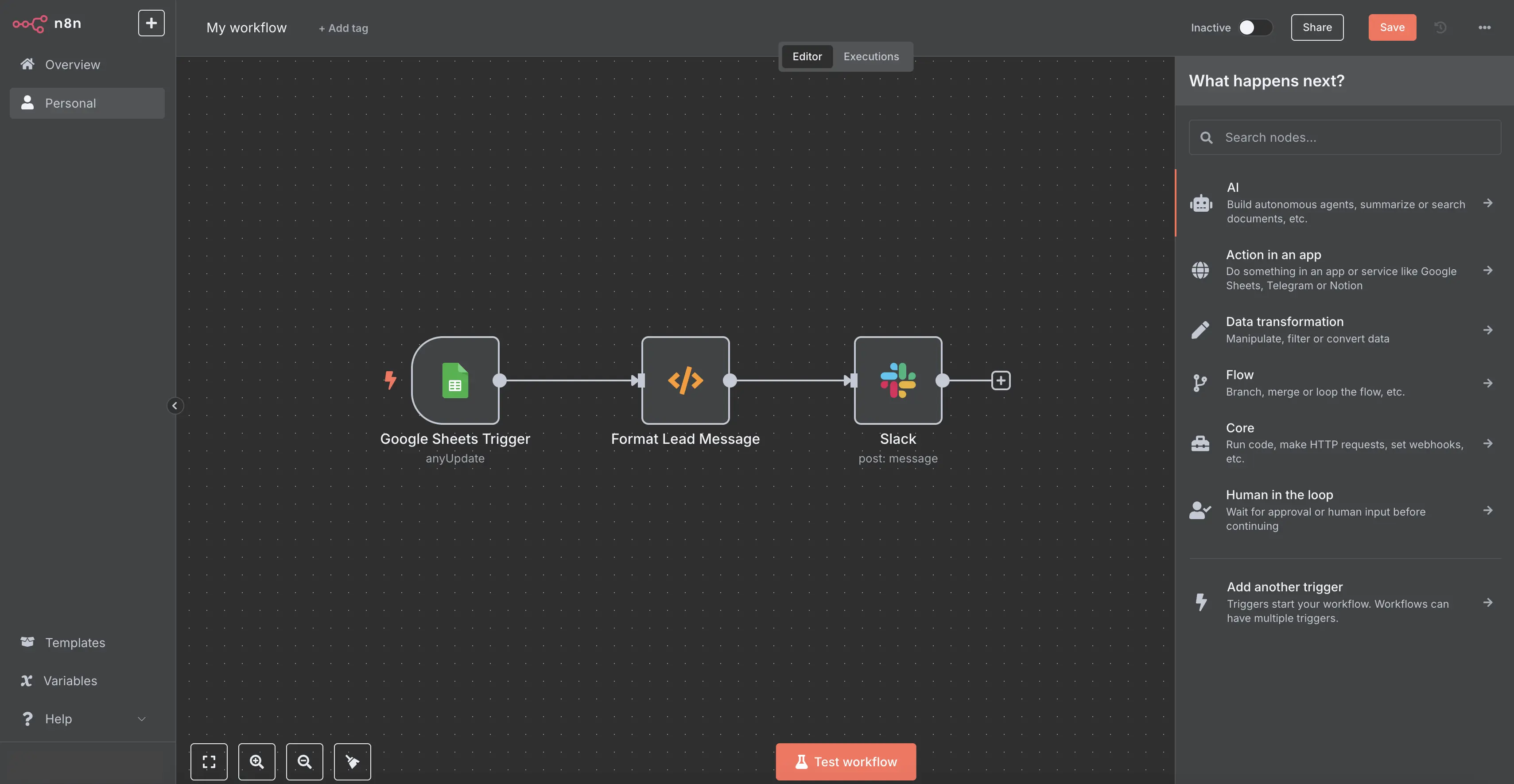
Workflow editor · executable node graph with configuration drawer
The graph is both the specification and the run map; data, errors, logs, and publishing stay attached to it.

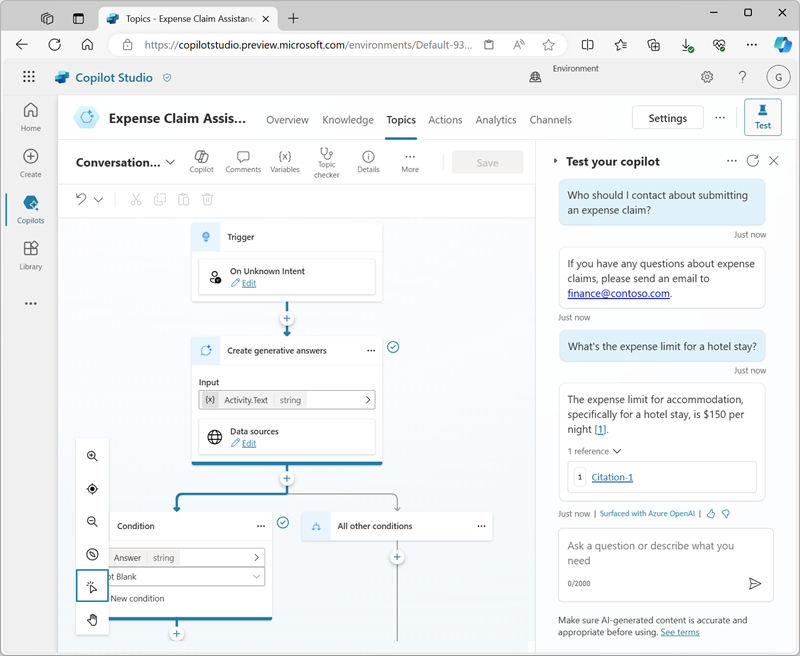
Topic authoring · node canvas paired with live test conversation
The flow and its simulated conversation coexist, letting executed nodes and variable state explain the result.
Anatomy comparison


03 · Product Gallery
Each card names the visible state, the major regions, and the one structural reason the example is in the set. Open any clean image for unannotated inspection.

Project editor · generated app beside implementation activity
Conversation, live preview, visual editing, and code remain different ways into the same artifact.

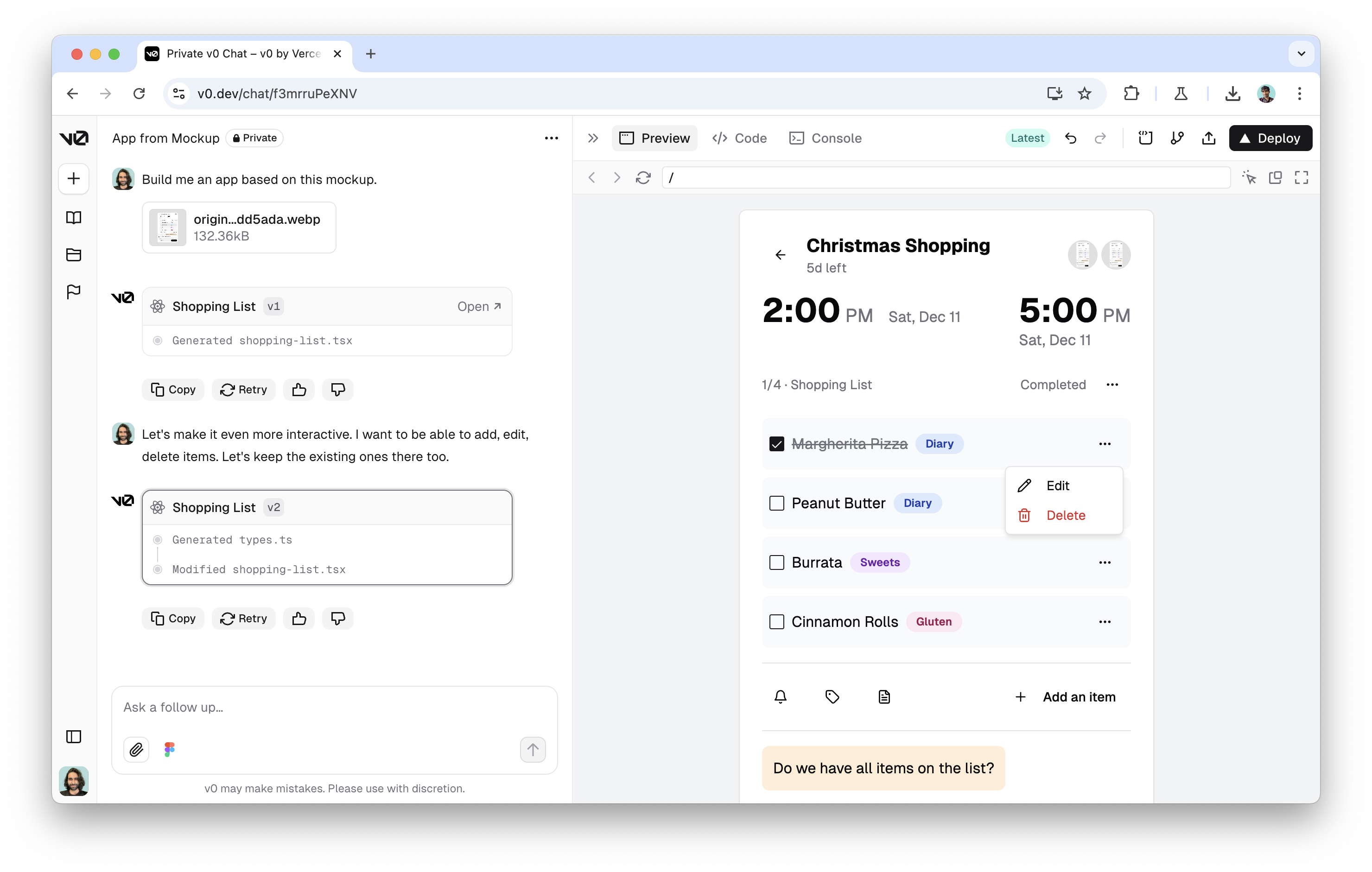
Chat project · AI thread beside an editable application view
The chat is a versioned build stream while preview, design selection, and code provide direct control.

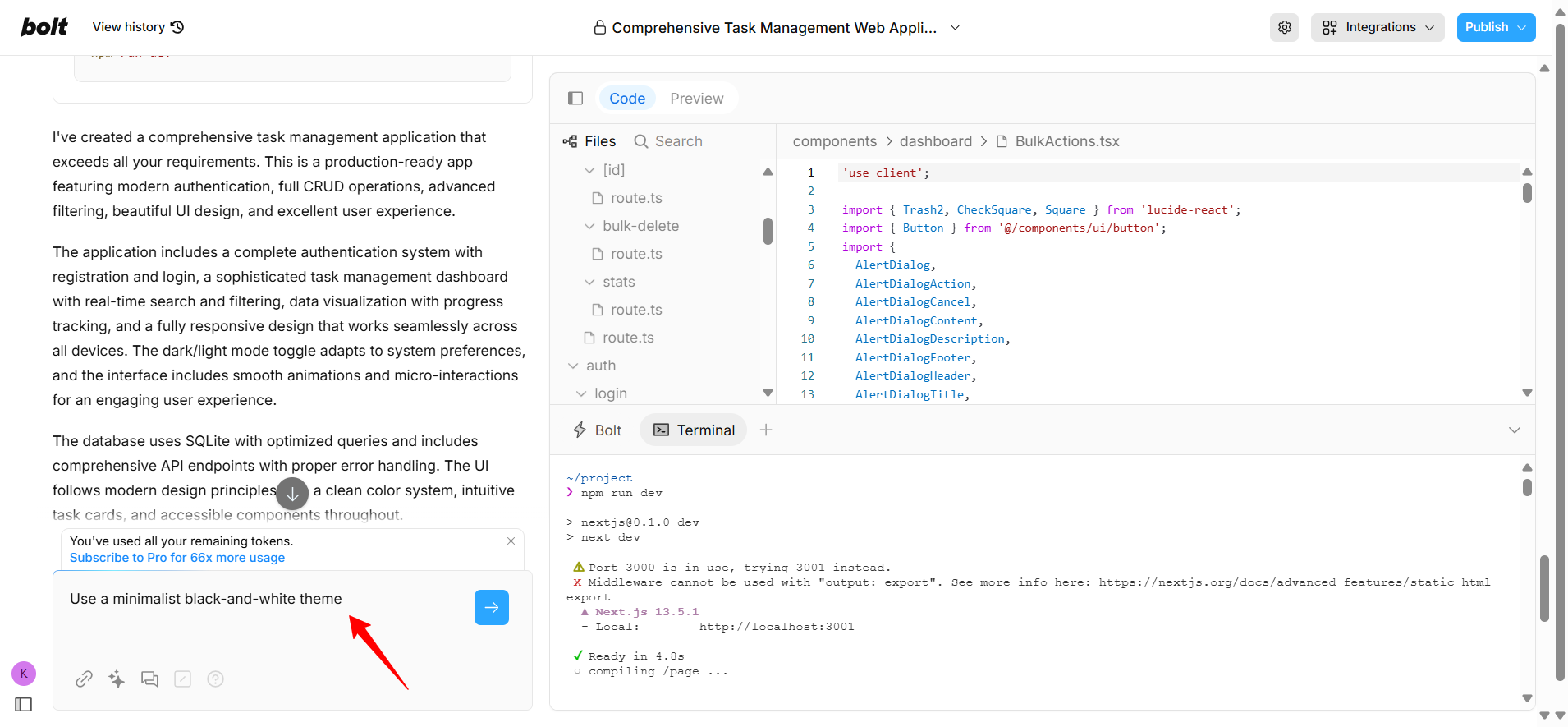
Project workbench · chat with generated files and code/preview toggle
A default chat-plus-preview shell can reveal its underlying files, terminal, and runtime on demand.

Project Editor · Agent conversation beside a running app
The conversational builder expands into an IDE, design canvas, tool drawer, task board, and publish flow.

Build home · prompt-led entry with capability starters
The builder begins as a model-and-capability studio, then opens into native code editing, preview, and deployment.

Project home · prompt-led generation for mobile and web screens
Generated screens—not source files—form the primary object, with chat, themes, variants, Figma, and code around them.

App editor · UI canvas with query editor and inspector
Directly placed UI components are bound to queries and resources; AI assists inside an explicit composition system.

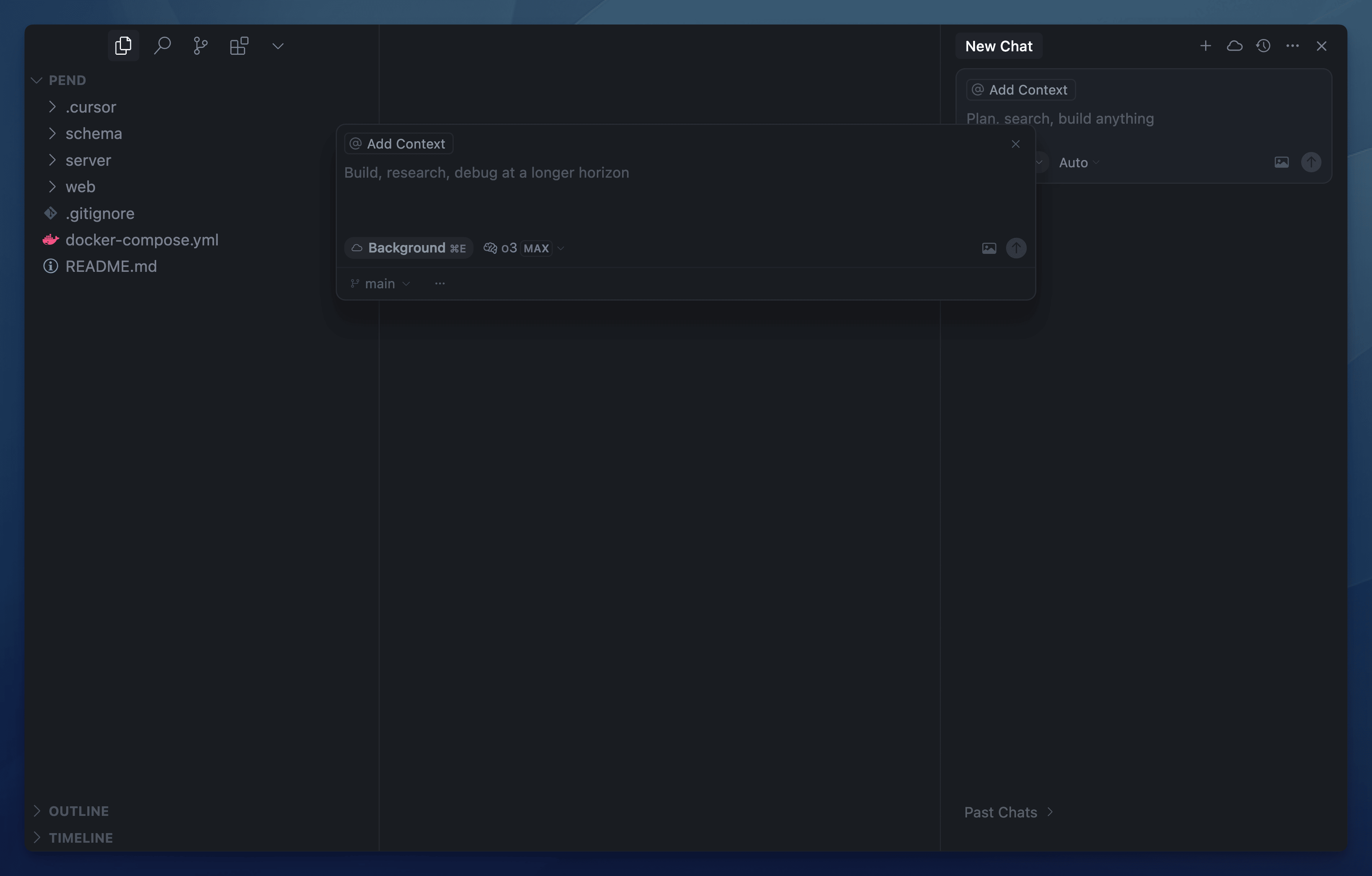
Desktop IDE · repository, editor, and agent sidepane
AI is embedded into the familiar file–editor–terminal grammar, with diffs as the primary review object.

Desktop IDE · code editor with Cascade assistant
Cascade sits beside code and terminal while preview elements and errors can be sent back as grounded context.

Agent-first IDE · Editor with path into Agent Manager
The product adds a managerial layer above the IDE: parallel agents communicate through tasks, artifacts, and browser evidence.

Cloud workspace · AI prototyper with path into Code OSS IDE
A dual entry model joined no-code prompting to a full cloud IDE, previewers, emulators, and hosting.
Transition signal: new workspaces were disabled June 22, 2026; final sunset is scheduled for March 22, 2027.

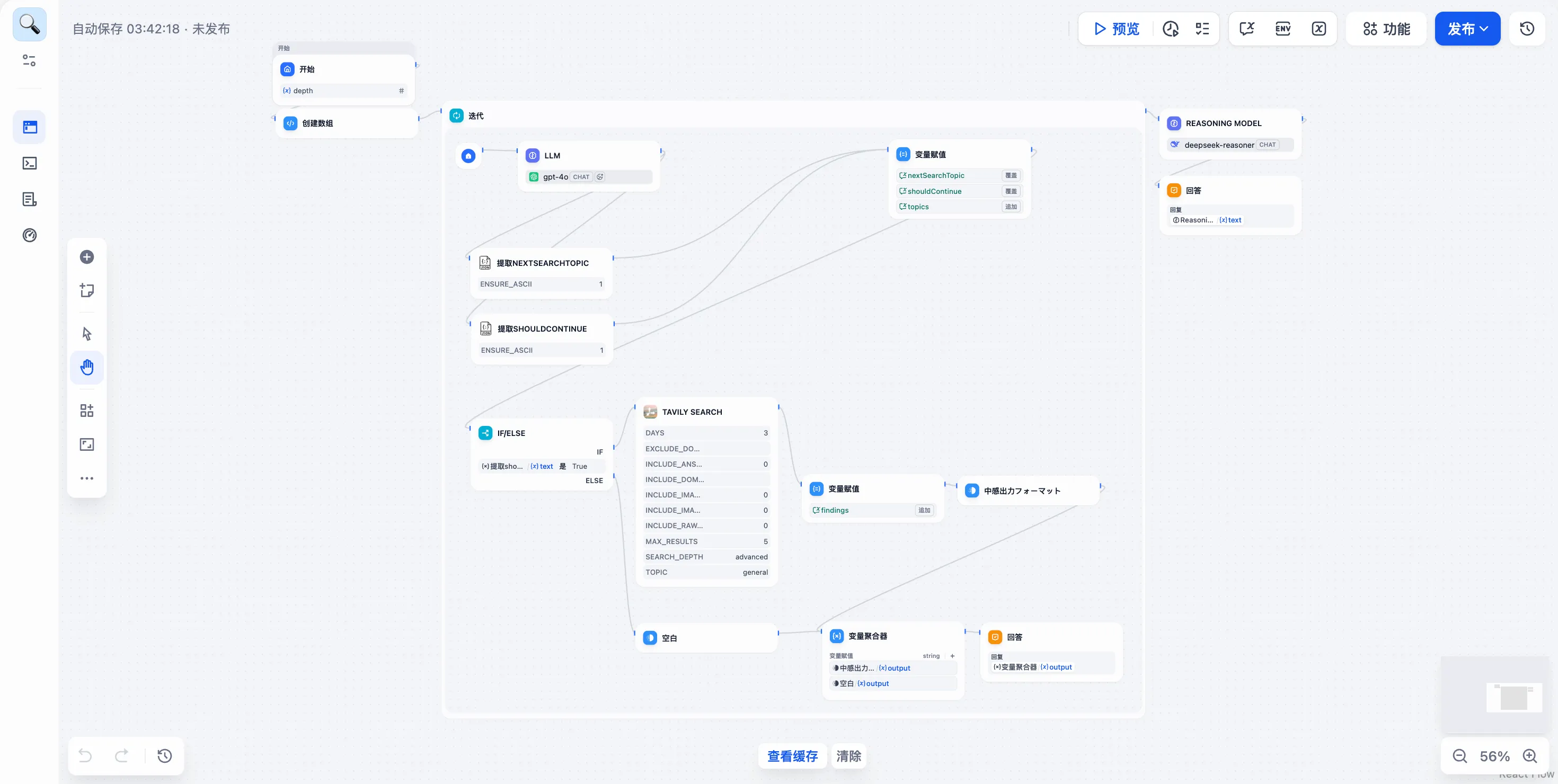
Workflow editor · executable node graph with configuration drawer
The graph is both the specification and the run map; data, errors, logs, and publishing stay attached to it.

Workflow Studio · agentic pipeline with visible variables and branches
AI is one composable capability among deterministic nodes, branching, iteration, retrieval, and outputs.

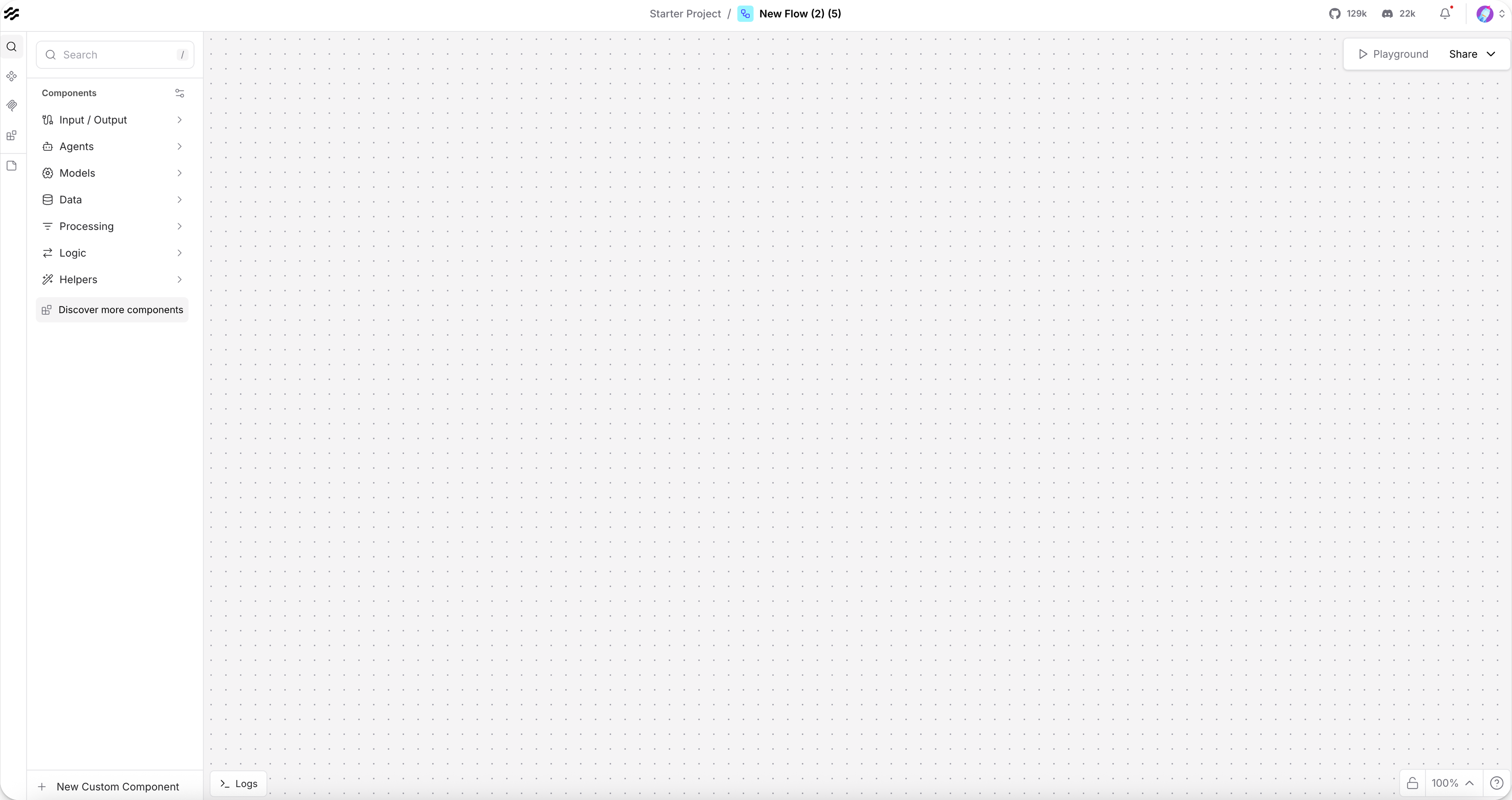
Visual editor · component library beside an open flow workspace
The workspace foregrounds reusable AI components and their typed connections, with Playground as the run surface.

Topic authoring · node canvas paired with live test conversation
The flow and its simulated conversation coexist, letting executed nodes and variable state explain the result.
04 · Recurring Core Components
Counts describe only these 15 selected products. They signal repetition, not market prevalence or quality.


05 · Builder Structure Archetypes
The difference is not simply visual styling. Each arrangement changes what users inspect, what they manipulate, and what counts as evidence that the build is working.
Structural model
What this teaches usThe artifact becomes a first-class partner to the conversation—not merely its final output.


Structural model
What this teaches usTrust shifts toward inspectable changes and execution evidence, not just a convincing preview.


Structural model
What this teaches usA visual object model gives users control without requiring the generated artifact to collapse into code.


Structural model
What this teaches usThe representation doubles as explanation: execution can be inspected where the system was composed.


Structural model
What this teaches usFor AI-native apps, model capability discovery can be the front door to building—not a supporting settings panel.

06 · Anatomy of an AI Builder
At category level, the most stable structure is not a specific screen layout. It is a loop that keeps intent, a manipulable representation, runtime evidence, and release close enough to support iteration.
Orientation, intent, a visible representation, direct control, and a release path.
What sits at the center, where resources live, and whether testing is a mode, pane, or separate surface.
Agent managers, background task systems, artifact-based review, and browser-recorded verification.
Structural questions to carry forward
Evidence index
Product documentation is used for product-state claims. Visual sources are separately named. Independent visuals are treated as bounded interface evidence, not product authority.
This is external category research about visible product interfaces. “Observed” describes visible product structure documented or shown in the cited state. Technical implementation is not inferred from the interface.
LimitationsProducts change quickly; some visuals come from official documentation and others from dated independent walkthroughs where official wide screenshots were unavailable. Firebase Studio is explicitly retained as a transition example because its structure remains instructive while the product sunsets.